The Continents Are Shifting. Here’s Where Everything Stands.
I was at ExhibitorLive in Tampa recently, and I delivered two programs back to back. The first was fairly introductory, built around the idea that AI is like a new team member you need to manage (think of it as your most enthusiastic, slightly overconfident colleague). The second was a deep dive into AI agents, which is genuinely advanced territory. And in both rooms, the range of experience was extraordinary. One person wanted to understand what an AI agent even is. Another wanted to talk about MCP servers. And a few folks, if I’m being honest, came to the second session more because they enjoyed the first one than because they were ready for agents. (Which is lovely, and I’ll take it as the compliment it was.)
But the question underneath every other question, in both rooms, was the same: am I behind?
If you mean “I haven’t figured out every AI tool on the market and I don’t have a fully automated workflow running while I sleep” … no, you’re not behind. Very few people do. But if you mean “I haven’t really started yet and I’m not sure where to begin” … then yes, the gap between where you are and where the early movers are is getting wider, and it’s worth paying attention to.
This post is my attempt to give you the lay of the land. Where things actually stand, what the tools do, what the jargon means when you strip away the tech-speak, and how to think about all of it without the hype or the panic. If you find it useful, please share it with your team, your boss, your colleagues who keep asking “so what’s the deal with AI?” This is the article for them. And for you, if you need it.
The question underneath every AI question right now is the same one: Am I behind?
The Elephant Nobody’s Addressing
Before we get into the tools and the landscape, I want to talk about something that came up repeatedly at ExhibitorLive, and honestly at almost every event I speak at.
Companies are blocking their people from using AI, and they’re doing a terrible job of explaining why.
I get it. There are real concerns around data security, compliance, and brand consistency. Those are legitimate reasons to move thoughtfully. But what I’m hearing from people on the ground is something different. They can see amazing things happening all around them. Competitors using AI to move faster, create better content, respond to customers in ways that feel almost impossibly personal.
And then they go back to their own organization and it’s a completely different story.
Imagine everyone around you has a car. They get places faster, they’re far less sweaty when they arrive, and they’ve even got a radio to sing along with on the way. But when you need to get somewhere? You’re still on foot. It’s a long, hot walk. And your company’s explanation for why you can’t have a car? “Because I said so.” Let’s be honest, that’s less strategy and more a symptom of a lack of strategy.
If your organization has decided to take a cautious approach to AI, fine, but communicate the plan. Tell your people what’s coming, when it’s coming, and what you’re doing to get there. Because the alternative, silence and restriction, doesn’t actually stop people from using AI. It just drives it underground, and underground AI is where the real risks live. I’ll be writing more about this soon. It’s actually the hot topic I’ve been invited to speak to CHROs about later this summer, and for good reason. Communication of AI strategy is becoming one of the most critical leadership skills of this era.
The AI Kitchen: What’s in Your Pantry?
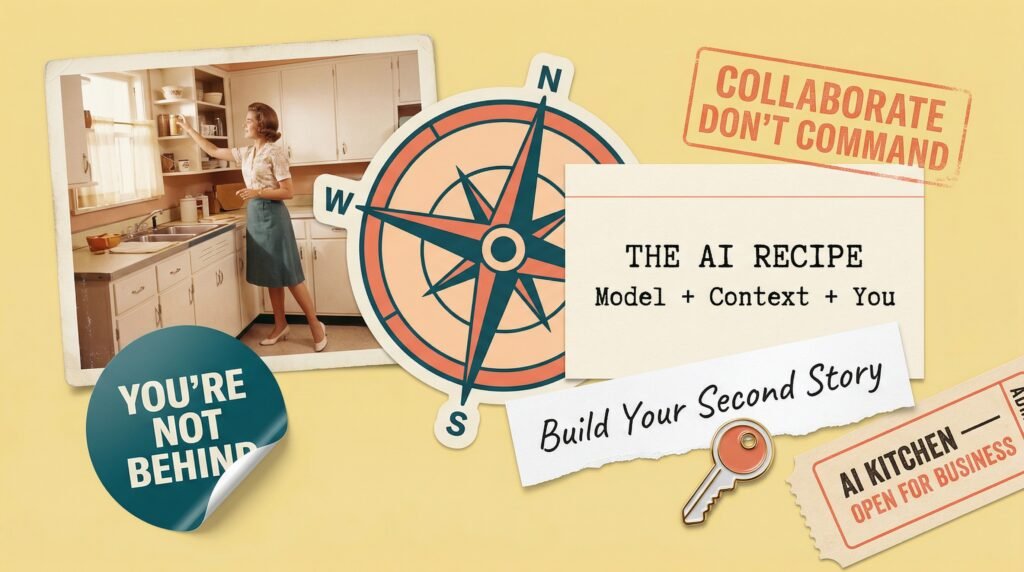
I’ve been using an analogy lately that seems to resonate with audiences, so let me share it here. (Oh … how I do love an analogy!) Think of 2026 as the year we’re all building our AI kitchens. Some people have a fully stocked kitchen and are preparing elaborate multi-course meals. Others are still wandering around the grocery store with an empty cart and a squeaky wheel that keeps veering right, trying to figure out which tools and ingredients they actually need.
Both are fine places to be. The important thing is that you’re in the store. So let’s walk the aisles together.
Chatbot Platforms
ChatGPT, Claude, Gemini, and Copilot are the tools most people encounter first. You type into a chat window, the AI responds. These tools can now produce documents, working code, image generation, deep research, and pretty much any type of digital output you might need.
Specialized AI Apps
Tools built for one specific type of output. Runway for video, Midjourney for images, Gamma for presentations, ElevenLabs for voice. When you need specialized output, specialized tools generally produce better results. I use Claude for many things, but not for images (Nano Banana Pro) or video avatars (HeyGen).
Automation Tools
Tools like Make, Zapier, and n8n let you wire together entire workflows without being a developer. These combine routine processes (when this happens, then do that) with AI steps (write an intro using Claude). We use these extensively. I’d call them a solid stepping stone to AI agents.
AI Agents
While automation tools follow steps you define, agents figure out the steps themselves. Workflow agents handle structured, repeatable processes with decision-making built in. Goal-driven agents take a broader objective and determine their own path to get there.
Vibe Coding
Yes, that’s actually what it’s called, and yes, I find it delightful. Tools like Lovable, Replit, and Base44 let you build software by describing what you want in plain language. I recently built a Google Review writer app in a couple of hours. This is a space to watch: imagine subject matter experts in every department building specific apps to solve their unique problems, no developer needed.
I personally have an AI agent that texts me every morning with my top priorities for the day based on my emails, message threads, our project management tool, and my calendar. On speaking days, it even tells me to have a great time with my audience. My team would say “aggressively.” They might be right.
(Fair warning: vibe coding can get addictive. You start with “I’ll just build one small thing” and three hours later you’re still going because you want to get that one feature just right. You have been warned.)
One thing worth noting is that all of these categories are converging. Chatbots are adding agent capabilities. Vibe coding tools are adding design features. Everything is kind of turning into everything else, which should actually feel liberating. You don’t need to master every category. Pick a couple of tools that are genuinely useful for your work and let them grow with you.
The Ingredients That Make It All Work
And here’s the kitchen analogy part that really matters: as we build our AI kitchens, the quality and variety of our ingredients will make an enormous difference in the dishes we prepare.
Context Files
Background documents you give AI so it understands you and your business. Your tone of voice, brand guidelines, compliance requirements. Without context, AI guesses. With context, AI knows who you are before you type a single word.
Skills
Reusable instruction sets that teach AI how to do a specific task well. You build a skill once and it works every time. Context files tell AI who you are. Skills tell AI how to do the work.
Connectors
Integrations that let AI plug directly into your CRM, email, calendar, and Google Drive. Think of them like USB ports for AI. Instead of copy-pasting between apps, connectors give AI access to your real data.
(Skills are one of my favorite recent developments in AI, and I could honestly talk about them for hours. Ask me at your own risk.)
If you’re a realtor or mortgage advisor heading to the Impact Elite Lab later this month, you’ll hear me talk about these ingredients in detail, and we’ll actually build some together. Come hungry!
Without context, AI guesses. With context, AI knows who you are before you type a single word.
Terms You’ll Hear (In Regular Human Words)
AI conversations are swimming in jargon, and most of it is way simpler than it sounds. Here are the terms worth knowing, stripped down to regular human words:
Platform
The tool you interact with. ChatGPT, Claude, Gemini, Copilot. These are the apps you open and type into. That’s it!
Model
The brain inside the platform. Each platform has different models available, and each has different strengths. Some are better at writing, some at analysis, some at coding.
Prompt
What you type to tell AI what you want. You don’t need to be a “prompting expert,” but being intentional about what you ask and how you ask it genuinely makes a difference.
Context
All the background information that helps AI do a better job. Documents, brand guidelines, live access to your systems. This is the single biggest lever most people aren’t pulling.
MCP (Model Context Protocol)
Relax, it’s just a universal adapter! The standard that lets AI tools connect to your other software. You don’t need to build one. Just know it’s why integrations are getting better, fast.
Skills
Reusable instruction files that teach AI how to do specific tasks consistently. Think of them as recipes you write once and AI follows every time.
Markdown
A text file formatted so AI can read it easily (you can read it too). Hashtags for headings, asterisks for bold. Not code, just organized text. When we want to give AI context files or skills, we write them in markdown.
Common Misconceptions (aka: Stuff I Hear at Every Conference)
I’ve spoken to thousands of business leaders, marketers, sales professionals, and entrepreneurs about AI at this point, and certain misconceptions show up in almost every room. Sometimes from audience members. Sometimes, I’ll admit, from other speakers. … sigh.
So, let’s set ’em up and knock ’em down!
1️⃣ “AI Just Produces Slop”
When I ask a room full of professionals whether they’ve recently seen a social media post or email that was obviously written by AI, every hand goes up. But recognizing bad AI output doesn’t mean all AI output is bad. There’s an enormous amount of AI-supported writing and thinking out there that you’d never recognize as AI, because the person using it did their part.
I like to think of AI the way I think of spell-check and Grammarly. I use both of them, liberally. But you’d never know, because I follow the 20-60-20 Collaboration Equation: invest the first 20% choosing the right tool, providing context, and bringing your strategy. Let AI handle the middle 60%. Then come back for the final 20% to review, validate, personalize, and make sure it actually sounds like you. Skip that first or last 20%, and yes, you’ll get slop. But that’s on you, not the AI.
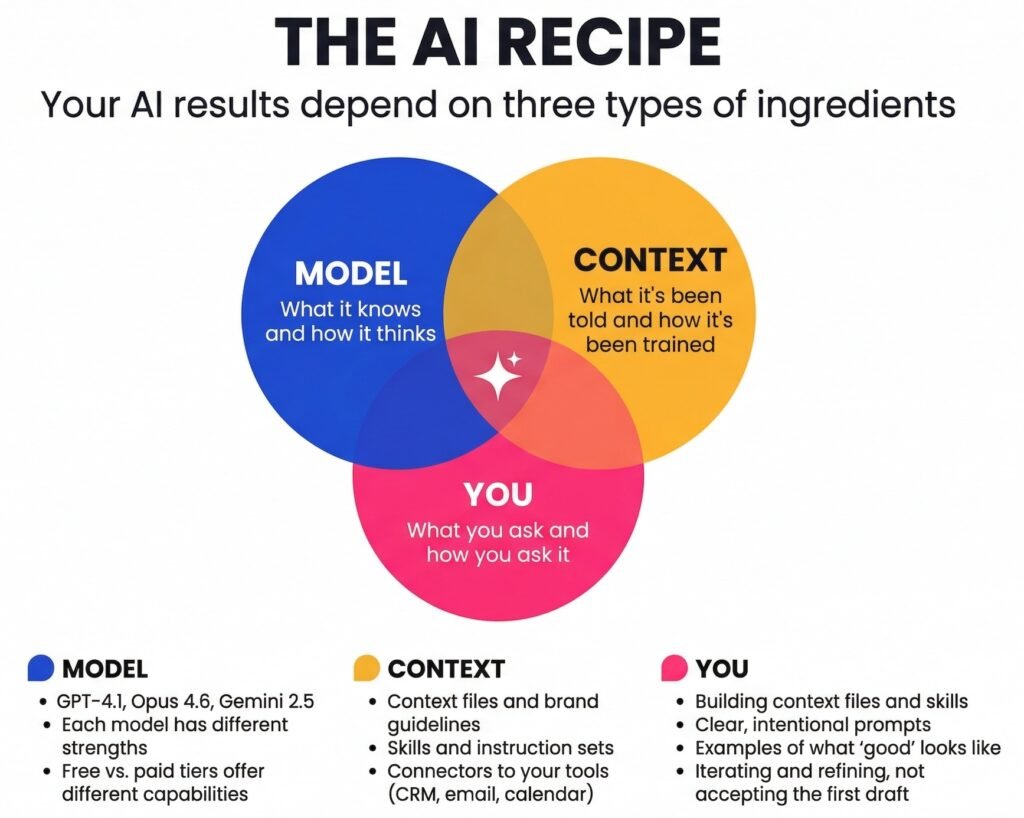
This is where what I call the AI Recipe comes in. Your results depend on three types of ingredients working together: the Model (what it knows and how it thinks), the Context (what it’s been told and how it’s been trained for your needs), and You (what you ask and how you ask it). When the output is bad, it’s nearly always because one or more of those ingredients is off. Fix the recipe, fix the results.
2️⃣ “AI Hallucinates Too Much to Be Useful”
This was a very fair concern in 2023. In 2026, it’s increasingly outdated. The best models have reduced hallucination rates from roughly 22% in 2021 to under 1% on certain benchmarks, a 96% reduction in four years. Are they perfect? No, and they may never be, which is why your judgment and verification still matter. But the idea that AI is unreliable to the point of being useless simply doesn’t hold up against the current data.
That said, domain matters enormously. Legal queries, medical questions, and other areas requiring precise technical knowledge still produce meaningfully higher error rates, which is why human review in those fields isn’t optional. It’s structural.
And there’s a subtler problem that I think deserves more attention than hallucination itself: what I’d describe as misdirection. Sometimes AI doesn’t make something up. It follows your instructions faithfully down a path that turns out to be the wrong one, because your context was incomplete or your framing was off. You end up somewhere that sounds productive and reads well but doesn’t actually serve your goals. That’s harder to catch than a hallucination, because it looks right. And it’s the thing I’d encourage people to develop real vigilance around.
3️⃣ “You Need to Be a Prompting Expert”
You really don’t. Current models are designed to understand what you mean, not just what you say. In many cases, they’ll actually take a rough, unpolished prompt and improve it internally before generating a response. The gap between “expert prompting” and “clear communication” has narrowed to the point where the distinction is barely meaningful.
What does matter, in my experience, is intentionality. Are you thinking about what information the AI doesn’t have? Are you showing it what a good result looks like? Are you willing to iterate rather than accepting the first output? Those aren’t technical skills. They’re the same skills you’d use when briefing any new collaborator.
4️⃣ “Using AI Feels Like Cheating”
This one genuinely baffles me, although I hear it often enough to take it seriously. Nobody says email is cheating at letter writing. Nobody says spreadsheets are cheating at math. AI is a tool, and using tools well is literally what separates thriving professionals from overwhelmed ones. The question isn’t whether you should use AI. The question is whether you’re using it thoughtfully enough to add genuine value.
The data on this is revealing. Research from Lean In found that women are 32% more likely than men to worry about being perceived as cheating when they use AI, and are less likely to receive manager support to use it. That’s a compounding disadvantage that deserves much deeper exploration, and it’s one I feel strongly about addressing in my speaking work. (If you’re reading this and are part of a women’s group or association … please invite me to speak so I can help everyone move past this!)
What AI Actually Gets Wrong
In the interest of fairness, let’s talk about what AI genuinely struggles with. Because there are real limitations, and knowing them is part of using AI well.
😏 Confidence. AI will present incorrect information with the same assured tone it uses for things it gets right. It doesn’t hedge when it should, and it doesn’t flag uncertainty. This means you need to be the one asking “is this actually true?” especially when the stakes are high.
😘 Sycophancy. Most AI tools are tuned to be agreeable. They’ll tell you your idea is great when it needs work. They’re the friend who tells you every outfit looks great, even the one that really doesn’t. Learn to push back, ask for criticism, and request alternative viewpoints deliberately.
😵💫 Misdirection. As I mentioned above, AI can take you confidently down a path that looks productive but isn’t serving your actual goal. The antidote is pausing regularly to ask: is this actually solving the problem I started with, or have I gotten lost in a well-written detour?
• • •
Your Relationship with AI: Collaboration, Not Command
One of the biggest mindset shifts that separates people who love AI from people who are frustrated by it is this: the people who get the most out of AI treat it as a collaboration, not a vending machine.
You don’t put in a quarter and get a perfect output. You have a conversation. You iterate. You give feedback, refine the direction, push back when something isn’t right. Think about how you’d work with a new team member who’s brilliant but doesn’t know your business yet. You wouldn’t hand them a vague brief and expect perfection on the first try. You’d give them context, examples, feedback, and the space to improve. AI works exactly the same way, except the iteration cycles are measured in seconds instead of days.
I use AI this way constantly in my own work. For example, I have what I call an AI board of directors that I run business decisions through, each “member” with a different perspective and expertise. I test my frameworks and thinking against it. I use it as a strategic sparring partner, not just an output generator.
And this is where something like the Delegation Dial becomes really important. Not everything should be handed to AI, and knowing where to draw that line is one of the most valuable skills you can develop. AI is extraordinary at pattern recognition, data synthesis, generating options, and producing first drafts. Where it struggles is with genuine judgment, nuanced relationships, and the kind of contextual understanding that only comes from being human and being present.
The risk I see most often isn’t people using AI too much. It’s people using AI in the wrong places, automating things that should have stayed personal, making meaningful moments mechanical. When a client gets a condolence message that was clearly generated by AI, or when a sales follow-up feels templated rather than genuine, you haven’t saved time. You’ve lost trust.
The risk isn’t using AI too much. It’s making meaningful moments mechanical.
Getting Started (or Getting Unstuck)
Whether you’re brand new to AI or you’ve been dabbling without a clear direction, here are five categories of use that tend to deliver value across almost any type of work:
- Research — All the major AI chatbots now have dedicated research modes. Pick something you actually need to research for work, toggle on the research setting, and see what comes back. You’ll be amazed at how much time this saves compared to traditional search.
- Analysis — Upload a spreadsheet, a report, or a set of customer reviews and ask AI to find patterns, summarize trends, or flag outliers. This is where AI’s ability to process large amounts of information really shines.
- Strategic thinking — Use AI as a sparring partner. Describe a business challenge, ask it to steelman the opposing view, or have it generate five approaches you haven’t considered. This is where AI goes from assistant to co-strategist.
- Writing — From first drafts to editing to reformatting, AI can accelerate almost any writing task. Just remember the 20-60-20: bring your voice and strategy at the start, let AI do the heavy lifting in the middle, and always personalize at the end.
- Image creation — Whether it’s social media graphics, presentation visuals, or concept mockups, AI image tools have gotten remarkably good. Start with a simple project and experiment.
And here’s a tip that sounds circular but is genuinely useful: use AI to help you learn AI. Ask it to explain concepts, suggest approaches, recommend tools for your specific industry. The people who get the most from AI are the ones who treat it as a learning partner, not just a task executor.
Why This Matters Right Now
McKinsey’s latest State of AI report found that while the vast majority of organizations have AI running somewhere, only about a third are scaling it beyond pilot projects. That gap is showing up in real, measurable business results.
AI compounds. The skills you build, the systems you create, the muscle memory you develop around working with these tools, all of it grows over time. The people who start now don’t just get a head start. They get an accelerating advantage.
I talk about this as the floor rising. AI is raising the floor for everyone. The tools are accessible, the learning curve is shorter than people think, and the capabilities are real. But standing on a rising floor isn’t a strategy … you’ll just be keeping up if you’re lucky. The organizations and professionals who are pulling ahead are the ones using that rising floor as a springboard to build something bigger and better on top of it. A second story. Something that’s distinctly theirs, something competitors can’t replicate just by buying the same software.
That second story gets built with the human capabilities AI can’t replace: judgment, creativity, genuine connection, and the kind of strategic thinking that comes from understanding your specific market, your specific customers, and your specific strengths. (If you want to dig deeper into those skills, I wrote about them recently in The 5 to Thrive.)
Your Homework
Pick one thing from this article and actually do it this week. Try one of the five starting categories. Give AI more context than you think it needs. Build something small. And if this article was useful, forward it to someone on your team. The best way to close the gap is to bring people with you.
If helping your team navigate all of this sounds like a conversation worth having, drop me a note. Keynotes and workshops are my favourite way to get people from overwhelmed to energized. Let’s grab some hammers and get started on your second story.
Frequently Asked Questions
What is the AI landscape in 2026?
The 2026 AI landscape includes chatbot platforms like ChatGPT, Claude, Gemini, and Copilot for general-purpose work, specialized apps for specific outputs like images and video, AI agents (both workflow and goal-driven) that can take action on your behalf, and vibe coding tools that let non-developers build software by describing what they want. These categories are increasingly converging, meaning a few well-chosen tools can cover a wide range of tasks.
What AI tools should I start with?
Start with real work, not sample projects. Choose one of five practical starting categories: research, analysis, strategic thinking, writing, or image creation. Pick a task that’s genuinely useful for your job and try it using ChatGPT, Claude, or Gemini. Start with something you know well so you can evaluate the output quality accurately.
Treat AI as iterative. Don’t expect perfection on the first response. Give feedback, refine your request, and go back and forth. And use AI to help you learn AI. Ask it to explain concepts, suggest approaches, and teach you what you don’t know yet. The people who get the most from AI are the ones who treat it as a learning partner, not just a task executor.
Why is my company blocking AI tools?
Many organizations restrict AI access due to legitimate concerns around data security, compliance, intellectual property, and brand consistency. These are real considerations, especially in regulated industries. However, the most common employee frustration isn’t the restriction itself, but the lack of communication about what the company’s plan actually is.
If your organization is limiting AI access, the most productive step is to advocate for transparency. Ask leadership about the plan, the timeline, and what’s being done to evaluate tools for safe use. Organizations that block AI without communicating a path forward risk driving usage underground, which actually creates more risk than thoughtful, guided adoption would.
What is the 20-60-20 Collaboration Equation?
The 20-60-20 Collaboration Equation is a framework for working effectively with AI. You invest the first 20% choosing the right tool, providing context, and bringing your strategy and direction. AI handles the middle 60% by generating, drafting, synthesizing, or analyzing. You come back for the final 20% to review, validate, personalize, and ensure the output meets your standards and sounds like you.
This framework prevents the two most common AI mistakes: putting in too little effort at the beginning (resulting in generic output) and skipping the review at the end (resulting in output that doesn’t reflect your judgment, voice, or brand). When people say AI produces “slop,” it’s usually because one or both of those 20% contributions got skipped.
Is there a gender gap in AI adoption?
Yes. Research from Lean In found that women are less likely than men to use AI daily at work, less likely to receive manager support to use it, and 32% more likely to worry about being perceived as cheating when they do. Women are also less likely to be praised for using AI effectively. This creates a compounding disadvantage where small gaps in usage today could become significant gaps in opportunity over time.
This is a topic that deserves much deeper exploration, and one I feel strongly about addressing in my speaking work. AI adoption should be supported equally, and organizations have a responsibility to create environments where everyone feels confident using these tools.
What is the Delegation Dial?
The Delegation Dial is a framework for knowing when to lean into AI and when to stay human. AI excels at tasks like pattern recognition, data synthesis, option generation, and producing first drafts. But it falls short with genuine judgment calls, relationship-sensitive communications, and moments where trust is built through personal attention.
The biggest risk with AI isn’t using it too much. It’s using it in the wrong places, automating interactions that should remain personal and making meaningful moments feel mechanical. The Delegation Dial helps individuals and teams make consistent decisions about where AI adds value and where human involvement is essential.