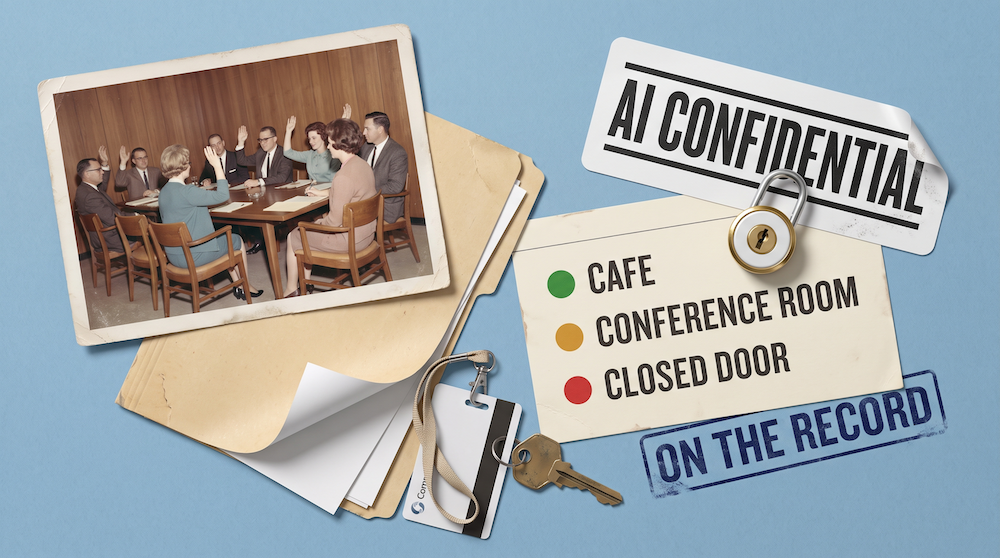
Nearly Every Hand in the Room Went Up
Are people in your organization using AI tools you haven’t approved, or that the company doesn’t know about?
I recently asked a room of senior executives this question. Nearly every hand went up (like 99%), and the few that stayed down belonged to people who told me afterward that they suspected it and just couldn’t prove it.
That’s the highest response I’ve had to that question yet, after climbing steadily for the past three years. To be fair, this wasn’t formal research, just a room being honest with itself for about ninety seconds. (Honest rooms are my favorite rooms.)
What would your answer have been?
People tell me things, you see. After a keynote, in the coffee line, in the taxi on the way to the airport, someone always leans in with a story about the thing they pasted into ChatGPT and would rather nobody ever found out about, or some random and often questionable use of AI they’ve seen or done. I’ve thought about starting a newspaper column, something like “AI Confidential.” (Anonymous, obviously. I’d never survive the first week otherwise.)
When it comes to using shadow AI tools (that’s what we call unapproved, clandestine AI tools), people really aren’t trying to break the rules. There’s a real deadline, a tool that would obviously help, an approval process with no visible end date, and a person who decided to help themselves.
And the real numbers confirm what those leaders suspected. In PagerDuty’s 2026 Shadow AI Survey of 1,250 office professionals, two-thirds said they’ve used AI at work while believing it wasn’t permitted under company policy.
This is probably less of a discipline problem and more of a description of how work gets done now.
Further down the same report, 39% said they’d rather use AI and tell nobody, and 29% weren’t sure whether their use was allowed in the first place. In other words, a large chunk of your team isn’t defying you or the company policy, they’re just guessing. And more than a third have entered customer/client data into a public AI tool. Clearly there’s a point where it stops being a harmless misunderstanding and becomes commercially risky.
Your people aren’t reckless. They’re on a deadline.
Why “don’t” doesn’t hold
Telling people not to use their own AI tools works about as well as telling them not to make a personal call on their work phone. Convenience wins, it usually does. The license you haven’t issued yet isn’t helping them. The approval you’re getting around to isn’t moving at the speed of their Thursday.
So a policy that opens with don’t tends to produce two groups: 1) the people who ignore it and 2) the people who hide it. Neither group makes you safer, and the second one costs you the ability to see anything at all.
What works better, in my experience, is helping people understand why the line sits where it does and what actually happens to the words they type.
What secure really means
The two biggest considerations around security are:
- Who can see what you share in a chat
- What happens to the data that you type into chats (for example, is it being used as part of the training data for future AI models)
The chat that feels private
If I’m being honest, even I sometimes forget that AI is a software tool with real stored data. An AI chat reads like texting a very well-read colleague at midnight. The voice mode you use is transcribing everything. The document you uploaded is getting ingested. And it’s all getting stored somewhere.
On a corporate account, your administrators can generally reach everyone’s AI chat history. Anthropic, for example, ships a Compliance API for Claude Enterprise that gives security teams access to chats, files and projects, and OpenAI states on its enterprise privacy page that workspace admins can audit conversations through its equivalent. Those conversations can be pulled for an internal investigation and produced in legal discovery. (I’ve watched beads of sweat form on many an executive’s forehead when I share that.)
While having the right license and security protects you from the vendor, it doesn’t make you (or your activity) invisible.
On consumer plans, whether your chats get used to improve the models comes down to a privacy setting most people have never opened, usually presented as something warm and community-minded along the lines of “help us make Claude better for everyone.” If you don’t know what I’m talking about, go and research this and make sure it’s turned off on your account … yes, right now, I’ll wait.
Retention is the other side of it. Your corporate agreement probably specifies how long conversations are kept by the AI vendor, where they’re stored, and what happens when you ask for deletion. Consumer plans vary, and retention can stretch to five years if the training setting is left on. Those terms rarely line up with what your company has promised its own clients.
Chats are bigger than you might realize
A chat stopped being a sealed box a while ago. Memory, for example, carries details between conversations, projects hold uploaded files for reuse, connectors reach into inboxes and CRMs, and browser extensions and third-party wrappers route your text through a company you’ve never heard of on the way to the model you thought you were using.
Even if someone deletes the conversation that worried them, the actual file they included could still be sitting in a project, feeding every chat that follows.
Picture a frustrated vent about a colleague, typed into what felt like a private window, during a stretch that later becomes a termination dispute. Or maybe it’s a client’s confidential numbers, pasted into a conversation on a Friday afternoon to speed up a summary nobody was going to read closely anyway. Neither of those started out as misconduct, and either one can end up being treated as exactly that.
AI chats feel private but they aren’t. Make sure your team knows.
Three things to say instead of one rule
When you talk to your team, give them three things TO DO rather than a prohibition of DON’T DOs.
Tell them what goes where
Which tool for which kind of information, in plain language, using examples from the work they actually do. Keep it short and easy for them to remember and reference. The version I use with clients is a traffic light with three places attached.
✅ GREEN (a Cafe)
The things you’d say out loud at a cafe table without a flicker of panic if the people next to you overheard. Public information, general questions, structure, drafting, brainstorming, learning something new.
Use any tool, no permission needed.
⚠️ YELLOW (a Conference Room)
The things you’d say in a room full of colleagues with the door shut. Meeting notes, internal drafts, process documentation, planning.
Approved tools only, with names and identifying details stripped out.
⛔️ RED (a Closed Door Office)
The conversation you’d only have with one person, and only after checking who else is within earshot. Customer and employee data, financials, contracts, credentials, anything under NDA or governed by a regulator.
Only approved tools with an agreement behind them, never a personal account.
If you’re unsure which room something belongs in, assume it’s RED until somebody tells you otherwise.
Tell them what’s on the record
Say plainly that chats are stored, that business accounts are visible to administrators, and that personal accounts run on consumer terms that aren’t written with your compliance obligations in mind (putting confidential information into a consumer AI tool means handing it to a company your organization has never signed anything with, which is precisely the problem). I’ve seen people fired for doing it. Don’t use scary legal terms or 7pt font, just explain it in human words. People do want to do the right things!
Tell them what to do when it goes wrong
Give them a route that doesn’t start with punishment, a named person to go to and a first step to take. If the only response to a mistake is trouble, you’ll stop hearing about mistakes and you’ll carry on having them, which is, as it turns out, the worst of both outcomes.
If it’s already happened
Someone on your team has already pasted something they shouldn’t have. (Statistically speaking, several someones.) The useful thing to understand is what cleanup can and can’t do. Deleting a chat removes it from view instantly but it will generally still sit on the provider’s servers for around 30 days before it’s fully purged. And if the content was already used for training, it can never be retrieved and removed. No AI company can un-train a model.
Before anyone catches a bus straight to panic, a trained model works nothing like a database. It doesn’t file your document away as a record it can look up and hand to somebody else, it learns patterns across an enormous volume of text, and a document that went in once is unlikely to have been memorized at all.
Of course, unlikely isn’t impossible, particularly for unique strings like account numbers, so take that as a reason not to panic rather than a reason to relax. And if the information belonged to a client, tidying up the tool doesn’t settle what you owe the people who own that data. (I’m an AI strategist, not your attorney. Get your own legal advice and follow all mandated company policies!)
Once you’ve had the conversation, write it down in that order. Principles first, so people can reason their way through situations you didn’t anticipate, then the policy, then the playbook that shows what good looks like in their actual job. If you want a starting point for the policy layer, I’ve published a sample one you can adapt. And if the question underneath all this is whether a task should involve AI at all, that’s a different dial, and I wrote about that one here.
• • •
The goal isn’t fear. It’s fluency.
Your homework
Consider running an anonymous survey to ask which AI tools people are using at your company and, more importantly, what they’re using them for. (The second question is super useful because it can help you see which gaps in your approved stack are driving people elsewhere. You can’t fix what you can’t see!)
Then put twenty minutes on the agenda at your next team meeting and do three things. Write your Cafe, Conference Room and Closed Door list on one page using real examples from your own work rather than generic ones.
Also explain personal accounts and retention. Then name the person someone should go to the moment they realize they’ve pasted or input something they shouldn’t have somewhere.
None of this has to be frightening
People who understand why a line exists turn out to be far better at holding it than people who were just told it was there.
If your organization needs this conversation to happen in a bigger room than yours, that’s a good chunk of what I do from the stage. Drop me a note and let’s talk about it.
Frequently Asked Questions
Can my employer see my AI chats?
Yes, in most business setups. If you’re using a company account on Claude Enterprise, ChatGPT Enterprise or Business, or Microsoft Copilot, administrators can access conversation content through compliance tooling built for audit, security and eDiscovery. Chats on a personal account aren’t visible to your employer in the same way, although anything done on a company device or network may be.
Nobody is reading your conversations over your shoulder. The record exists, though, and it can be retrieved when there’s a reason to retrieve it, such as an internal investigation, a regulatory request or litigation. Treat a work AI chat the way you’d treat a work email rather than the way you’d treat a private text.
Is it safe to use a personal ChatGPT or Claude account for work?
For public or non-sensitive work, generally yes. For anything involving customer data, employee data, financials, contracts or anything under NDA, no. Personal accounts sit outside your employer’s agreements, controls and data protections, so the organization loses both the legal cover and the visibility.
Retention is the part people miss. Consumer licenses run on consumer terms, which set their own rules on how long conversations are kept and whether they can be used to improve models. Those terms rarely meet the standard your company has committed to with its own clients and regulators, so a personal login can put your employer out of compliance without anybody intending it.
Should we ban unapproved AI tools?
A blanket ban rarely works and usually makes things less safe. People who need the tool will keep using it on personal devices and personal accounts, which moves the activity somewhere you can’t see, audit or protect.
A better approach pairs clear guidance with a fast route to approved tools. Most shadow AI use starts with a genuine work problem and a slow procurement process, so shortening the gap between “I need this” and “you’re licensed for this” removes more risk than any prohibition will.
What information should never go into an AI tool?
Customer and client data, employee records, financial information that isn’t public, contracts, credentials and passwords, source code covered by agreements, and anything a regulator or an NDA governs. None of that belongs in a personal account, and in a business account it belongs only in tools your organization has a signed agreement with.
The practical test that works best is simple. If you’d say it happily at a cafe table with strangers nearby, it’s fine anywhere. If you’d only say it behind a closed door to one person, it needs an approved tool with an agreement behind it, and when you’re unsure, treat it as the closed door until somebody with authority tells you otherwise.
Do AI companies train their models on my conversations?
It depends entirely on which plan you’re on. Business and enterprise plans from the major providers don’t use customer conversations for model training, and that’s normally set out in the commercial terms and the data processing agreement. Consumer plans are different, and whether your chats are used often comes down to a setting in your account.
This distinction is the single most useful thing to teach your team, because it’s the one that changes behavior. Same tool, same interface, completely different data treatment depending on which account someone happens to be signed into.
What should a leader actually say to their team about AI safety?
Three things. What kind of information belongs in which tool, what’s on the record and visible to administrators, and who to go to when something goes wrong. Keep it to plain language and real examples from the work your team does, not a legal briefing.
The tone matters as much as the content. If the conversation reads as a warning, people will hide their AI use rather than change it. If it reads as an explanation of how the systems work, people can apply judgment to situations your policy never anticipated.
What should I do if I’ve already pasted confidential information into an AI tool?
Check whether the model training setting was switched on in that account first, because it changes everything that follows. Then delete the conversation, remove the file from any project you added it to, clear anything the tool’s memory captured, switch the training setting off, and file a formal deletion request with the provider. Depending on where you live you may have additional deletion or notification rights under GDPR, CCPA or similar.
Deleting a chat removes it from your view immediately and the content typically sits on the provider’s servers for around 30 days before it’s purged. If the content was already used for training it can’t be pulled back out, because no AI company can un-train a model. And if the information belonged to a client or your employer, cleaning up the tool doesn’t settle your obligation to the people who own that data, so involve whoever handles compliance. This is the point where you want actual legal advice rather than a blog post.
Will an AI policy fix shadow AI?
Not on its own. Policies tell people what the rules are, and most shadow AI happens because people either didn’t know the rules applied to them or couldn’t do their job inside them. A document alone doesn’t close either gap.
What closes it is the combination of a conversation people remember, guidance short enough to recall under pressure, approved tools that genuinely do the work, and a safe route to report mistakes. The policy documents the decision, but the conversation is what changes behavior.