The Floor I Got Giddy About
Last week I took you on a tour of an entire office building and called it Claude. We rode past the front desk, poked our heads into the conference rooms, and met the whiteboard on wheels with the questionable memory. Right at the end, on one particular floor, I got a bit giddy and promised you the whole next post. This is the promised post.
The thing I got so excited about was Skills. These are your new specialist colleagues and, honestly, they’re my favorite thing to happen to AI since projects, so settle in, because I’m about to go full “Julie” in this one.
Let me start with a moment you’ll recognize. You sit down with your AI, you explain exactly what you need, you give it the context, the format, the tone, the example, the lot. It comes back with something genuinely good. You’re delighted. Then tomorrow, you open a fresh window to do the same kind of task, and … you’re explaining the whole thing again. From scratch. You give it the same context, same format, same tone, as if the two of you have never met.
(I have, more than once, muttered “we have LITERALLY done this before” at an entirely innocent chat window.)
Sound familiar? That, right there, is the gap a skill closes.
What Is a Skill, Exactly?
A skill is a small, self-contained package that teaches your AI how to do a specific task. At its core it’s a set of written instructions, and alongside those instructions it can carry whatever the job needs, examples of good output, reference documents, brand rules, even connections to other tools. You build it once. From then on, whenever that task comes up, the AI opens the package and follows it.
In Claude, a skill is a tidy little folder with an instruction file at its heart, and it lives in one of two places depending on how widely you want to use it. Add it to your account and it’s available everywhere you work. Add it to a single Project, your dedicated room for a particular kind of work, and it stays put in that room, ready whenever you walk in. You manage them under Customize, where you can add, toggle, and remove them whenever you like.
This isn’t a Claude-only idea, though. Skills started life in the more technical AI tools and have moved into the everyday chat experience, and the format has been published as an open standard, which is the unglamorous but important detail that means skills are designed to travel between tools rather than stay trapped in one. Same concept, different front doors.
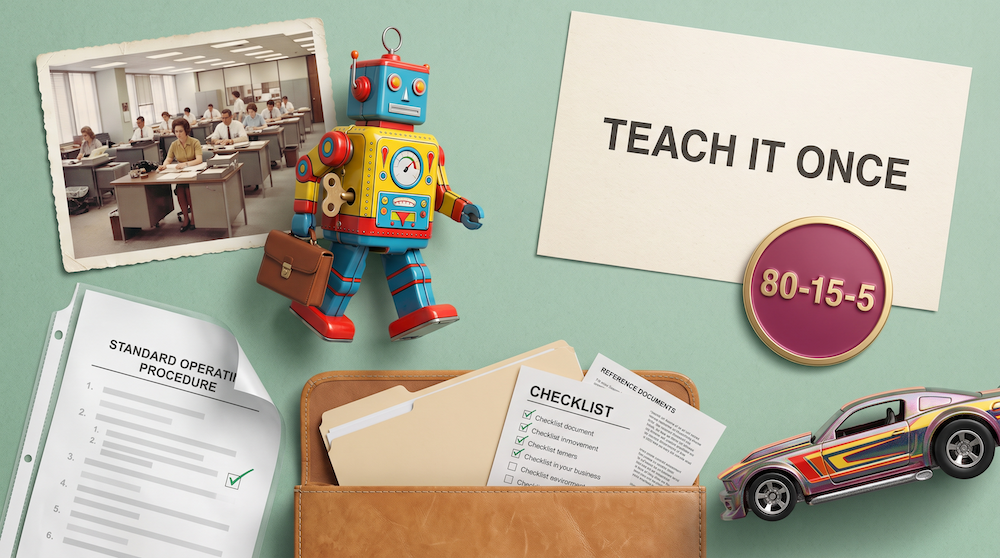
In other words … I like to think of them as little robots that wander the office with a briefcase full of everything they need to do one job properly. You walk around muttering something about “write a proposal” and a little robot perks up and says, “Proposal?! Oooh! I know how to write your proposal! Here I come to save the day!” It rushes over and jumps in to go through YOUR proposal process just the way YOU told it to.
(You knew I’d get to an analogy eventually. I just can’t help myself.)
And the part that delights my team and me every time is that, unlike most of us, this robot genuinely loves an SOP (standard operating procedure). It reads the procedure and follows it to the letter, every single time, with no drift, no shortcuts, no creative reinterpretation just because it’s a Friday afternoon.
If you read last week’s tour, you’ll remember the instructions sitting on your profile. These are the standing rules that tell the AI who you are and who your business is. Those are the same wherever you wander in the building, like an ID badge you carry everywhere. A skill, on the other hand, goes a step farther and focuses on how to do a task.
A great prompt is a one-time win. A skill is a capability you keep.
Why This Matters
Beyond rescuing you from explaining-yourself-on-repeat, skills are brilliant for five big reasons.
Speed. A skill collapses a long, fiddly process into a short instruction. The thing that used to need a full paragraph of setup, with the format and the tone and the example and the don’t-forget-the-disclaimer, becomes “write this proposal.” All the complexity stays in the briefcase. You just name the job.
Consistency. A skill does the work the same way every time. Okay, confession time. I am not always a diligent updater of my CRM. I mean to, I really really do. It’s just that I hate data entry! I’ll finish a great call fully intending to log it properly, and somewhere between hanging up and typing, my notes degrade into “spoke to Bob, seemed keen, follow up.” Useful to nobody, future me included. My CRM skill does not have this problem. If the job is fifteen fields, it fills fifteen fields, the same way, at nine in the morning or the tail end of a Friday. It does more than I would, not less. And it does it without complaining, something I haven’t mastered yet.
Portability. A skill is really just a packaged file, which makes it wonderfully movable. You can pick up ones other people have built (carefully, more on that in a minute), build your own and hand them to your team, or make one in Claude today and use it in another tool tomorrow. Because underneath it really is just text and a few reference files, you can drop a skill into almost any chat and have it work. Think about what that does for a team. Your best salesperson’s way of running a follow-up, your sharpest writer’s way of structuring a proposal, captured and handed to everyone. Best practices stop living in one person’s head.
Callable. You don’t summon a skill with a magic word. You just talk. “Let’s draft a proposal” calls it. So does “this client’s ready for the proposal stage.” The skill recognizes the job from how you describe it and steps forward on its own, no command to memorize, no menu to dig through. (Revolutionary concept. You talk, it listens.)
Sizable. A skill stretches to fit the work. The smallest is nothing but a tidy set of instructions. The largest is a folder bursting at the seams with reference documents, example files, resources, lists of other apps to connect to, and step-by-step procedures. Same idea, scaled up or down as the job demands.
Now, you might be thinking that memory handles all this, or that you just keep working in the same chat. And those do work … mostly. But they’re a leaky, improvised version of the real thing. Memory decides for itself what’s worth keeping, with the curatorial instincts of a toddler emptying their pockets after a day out (pocket contents, a rock, half a cracker, one very important leaf). And the forever-chat eventually clogs up and slows down.
However, a skill is deliberate, portable, and repeatable in a way neither of those can match. I promise, once you’re skilled, you don’t go back.
Lead a Team or Just Want to Be Awesome?
Another way to look at it. Everyone is driving the same car off the lot right now. Same model, same features, same sticker price, bought the same week.
A skill is you souping up the engine of your AI, adding the custom trim, sorting out the interior, and hanging a “my dog is smarter than your honor student” sign in the back window. It’s you making the thing yours … and better.
Everyone’s driving the same car off the lot. A skill is how you soup up the engine.
The Big Picture: The 20s Change with Skills
If you’ve read my one-page AI work playbook, you know the rhythm I teach for working well with AI. You bring the first 20%, the thinking and the framing. AI does the middle 60%. You own the last 20% that makes the output yours. That’s the 20-60-20, and it’s the right place to start.
Skills start to tweak those numbers in the best way.
When you create a skill, it’ll feel more like an 80-15-5 job. You bring 80%, the thinking and the standards and the examples of what good looks like. The AI does 15%, actually assembling and testing the thing into a working skill. You take the final 5% to check it over.
Do that once to get the skill defined and running, and your everyday use of that skill settles to something closer to 10-80-10. A little setup, a lot of doing, a quick review. The effort moves to the front of the job, just once, and then your work becomes faster and more consistent every single time. That’s the long game with skills. You’re shifting where your effort lives, not just shaving seconds off a task.
You’ve probably figured out that skills are best for consistent, repeatable processes where you know what good looks like … basically, any kind of task where you could write a great SOP.
Write down how the work is done once, and you stop being the bottleneck for it forever.
How to Build a Skill (for Mortals)
First, a disclaimer. Skills as I’m describing them currently exist in Claude (Chat, Cowork, and Code), which is one of the reasons our team is so hooked on Claude right now. They don’t yet exist as a formalized “thing” in ChatGPT, although I’m confident it won’t be long (they do exist in Codex, the coding side of ChatGPT). Same story with Google’s Gemini. They’re on the coding side but not yet the chatbot side. Having said that, skills are just text files, so you can make one and hand it to any chatbot the way you would any document. Not perfect, but better than nothing.
So, you have three easy ways to add skills, and all of them are code-free. You can import a skill someone else has already built. You can add one from Claude’s own skill library, ready to go. Or you can make your own by asking Claude to turn something you already do into a skill. Claude even comes with a skill whose entire job is helping you build other skills (so meta!) by asking you a few sensible questions and assembling the result.
The best part, in my view, is that you can ask Claude whether a task would even make a good skill before you bother building it. Free second opinion.
Give It a Go: Import the Humanizer Skill
There’s a popular one floating around the internet called the Humanizer skill, and it’s a great first import. It strips the obvious AI tells out of writing, the robotic cadence, the “in today’s fast-paced world,” all that slop. No technical chops required.
- Start a chat in Claude and ask it to “review this skill, tell me what it is and what it does: https://github.com/blader/humanizer“.
- If you’re happy with what it reports back, ask Claude to turn it into a file you can import as a skill. It’ll create a .zip file.
- Download the file it creates.
- Open Customize on the left-hand Claude menu, go to Skills, and click the plus sign to add one.
- Select Create Skill, then Upload a Skill.
- Pick the file you downloaded, and boom, you’ve got a skill. You’ll see it in the list and can read the instructions (remember, it’s just a text file after all).
- Use it in any chat by saying “can you humanize this text?” and either point at something in the conversation or paste in some text. You’ll see a little message telling you a skill is being called and which one.
A Few of My Own Skills (for Inspiration)
To get the wheels turning, these are a few of the specialists I keep on staff. They pretty much all started as jobs we got tired of doing the long way.
- Blog writer. Helps me find the angle, drafts in my voice, and goes a few rounds with me until a post is actually worth publishing.
- Blog packager. Turns the finished post into website-ready formatting plus the title, excerpt, tags, and category, all in one go.
- Blog image maker. Reads the finished post, works out what would make a good collage for it, writes the image prompt, sends it off to Higgsfield (an AI image platform) at the exact size I need, and hands me back a finished image. I ask for a blog image, I give it the blog, I get an image. Everything in the middle is the skill doing its thing.
- Writing grader. Marks my work against my own standards before anyone else sees it. More on this one in a second, it’s a favorite.
- CRM updater. Logs a call or email properly so I don’t have to rely on my “spoke to Bob” school of note-taking. I give it an email or a meeting transcript, and it knows how to connect to my CRM, what all the fields are, all my naming conventions, the works. It’s like magic, and it’s so cool that our team sometimes races to see who gets to process a deal first.
- Prospect researcher. Digs into a company and an event before a sales call using my 6 Factor Formula approach, so I walk in genuinely prepared.
- Agreement drafter. Builds a clean, fully formatted, tailored speaker agreement using my template, brand guidelines, and the deal details, dates and all.
- Post-event recap. Pulls audience feedback into a tidy summary I can share with an event organizer.
- Board of directors. A panel I summon on demand to cheerfully argue with me about a business idea or decision I’m wrestling with. (Yes, I built myself an irreverent board of directors. Yes, I find it very entertaining when they reference something that happened at the board retreat last summer.)
Give It a Go: Build a Grader
If you build one skill this month, make it a grader. It’s one of my favorite and most-used skills.
A grader evaluates something and hands you an honest read on its strengths, weaknesses, and where to improve. A great starter is one for your own writing. You give it a draft, an email, a proposal, a deck, whatever you’ve made, and it scores that work against the things you actually care about. Did it hit the goal you set? Is it the right format and length? Did it miss anything? And, my favorite, does it sound like you, or does it sound like a robot wearing your name badge?
My grader is a real part of my own last 20%, a review pass that catches what I’d otherwise miss or let slide. Mine flags me when I drift between US and UK spelling mid-paragraph (I blame my British family), and when I start writing like a chatbot. For the record, I maintain ChatGPT is copying me, not the other way around. Either way, it’s trained on my standards and applies them consistently, even on the awkward criteria I’d be tempted to wave through.
An Example of a Skill in Action
You might reasonably wonder whether a skill can really run a proper job start to finish, so let me show you with this very post.
This blog came out of my blog skill, and honestly, this is how it works. It runs in a few modes. In ideation mode, it checks my database of past posts and my catalog of content, then either suggests angles or kicks the tires on the ones I bring it. In drafting mode, it asks me a series of questions to pin down what I’m really after, drafts an outline I review and redraw, then writes the article in my voice. From there we go back and forth, sometimes a LOT, until it’s a post I’m actually proud to put my name on. And when I say “give me the package,” a separate output skill steps in and produces the website-ready version plus the title, category, excerpt, and tags. A little conga line of specialists, each doing its bit.
I bring the angle, the stories, and the stubborn opinions. The room does the heavy lifting in between.
• • •
Build Your Skill (Your Homework)
Last week I said most of us have been camped out in the lobby of a very big building. Skills are how you put the rest of that building to work. Pick the one job you keep re-explaining, or the one you keep eyeballing for quality, and build that specialist first. You’ll feel the difference on the very first try.
So, my actual ask. Go build one, even a scrappy one, and let me know if it worked. And if you’d like me to start sharing skill ideas the way I share prompts, tell me that too, because I’ve got a briefcase full of them and I’m always looking for an excuse. Getting teams out of the lobby and genuinely building with this is my favorite kind of work, on a stage or in a room together, so if that’s a conversation worth having for your people, come say hello.
Frequently Asked Questions
What is an AI skill?
An AI skill is a small, self-contained package that teaches your AI how to do a specific task the same reliable way every time. At its heart it’s a set of written instructions, and it can also carry examples, reference documents, and connections to other tools. You build it once, and the AI applies it automatically whenever that task comes up.
Think of it as a specialist colleague who carries a briefcase with everything needed for one job and never wanders off the playbook. Skills are built for everyday business work, not just technical tasks, so a proposal, a meeting recap, a customer reply, or a quality check are all fair game.
How is a skill different from a prompt?
A prompt is a single instruction you type in the moment, and its value disappears the second you close the window. A skill is that instruction captured permanently, so the AI applies it every time the relevant task comes up without you retyping a thing.
A great prompt gets you one good result. A skill turns that one-off into a repeatable capability. If you keep pasting the same long prompt over and over, you’ve basically been running a skill manually, and it’s time to let the AI hold it for you.
How is a skill different from instructions or context files?
Instructions are standing rules about how you want the AI to behave everywhere, like writing in US English or leading with the bottom line. Context files are background documents that explain who you are and what your business does. A skill is a how-to for a specific job that only activates when that job comes up.
They work beautifully together. Your instructions and context set the stage, and the skill is the specialist who walks on when there’s a particular task to do. (Last week’s office tour maps the whole building room by room if you want the full picture.)
Do I need to be technical to build a skill?
No. Building a skill is a writing task, not a coding task. If you can explain a job to a new hire in plain language, you can build a skill, and there’s even a skill whose whole purpose is to help you build others by asking you a few questions.
The only genuinely technical corner of this world is developer tooling, which most knowledge workers never need to touch. For everyday business work, you describe what you want, give an example or two of good output, and the AI assembles it for you.
Where do skills live in Claude?
A skill is a small folder with an instruction file at its heart, and you manage your skills under Customize. You can add one to your whole account so it’s available everywhere, or attach it to a single Project so it only shows up in that dedicated room.
You also get to toggle skills on and off, which is handy once you’ve built a few. The ones you’ve imported or created sit in your library, ready for the AI to reach for whenever your request matches the job a skill was built to do.
Which AI tools have skills right now?
Skills first showed up in the more technical tools and have now arrived in the everyday chat experience too. Claude has them, and the other major platforms are actively building their own versions.
The skill format has also been published as an open standard, which signals that skills are meant to travel across tools rather than stay locked inside one product. If your platform doesn’t have them yet, you can fake it today by writing the instructions yourself and handing them to your AI to follow each time.
Can my whole team use the same skill?
Yes, and this is where skills get genuinely powerful for a business. Because a skill is essentially a file, you can share it so everyone works from the same playbook instead of each person reinventing the approach.
This is how best practices stop living in one person’s head. You can capture how your strongest salesperson runs a follow-up or how your best writer structures a proposal and hand that exact capability to everyone. Just glance through any skill you didn’t build yourself before you trust it, since you’re importing someone else’s instructions.
How is a skill different from an AI agent?
A skill teaches the AI how to do a specific job well. An agent is AI that takes a goal and decides the steps to reach it on its own. The skill is the know-how, the agent is the autonomy.
The two are complementary. An agent working through a multi-step task can lean on your skills to do each part the right way. If the autonomous side is what you’re curious about, I dug into that in my AI agents primer.