The AI Agent vs My Digital Junk Drawer
When Anthropic launched Claude Cowork on Mac in January, I downloaded it within the hour. Not because I needed another AI tool (my accountant/hubby would argue I have plenty) … but because this one promised to DO work, not just give me a place to do my own work faster. I’d been building with agents for some time but this was the first one that I felt could effectively work directly on my computer, in my personal space.
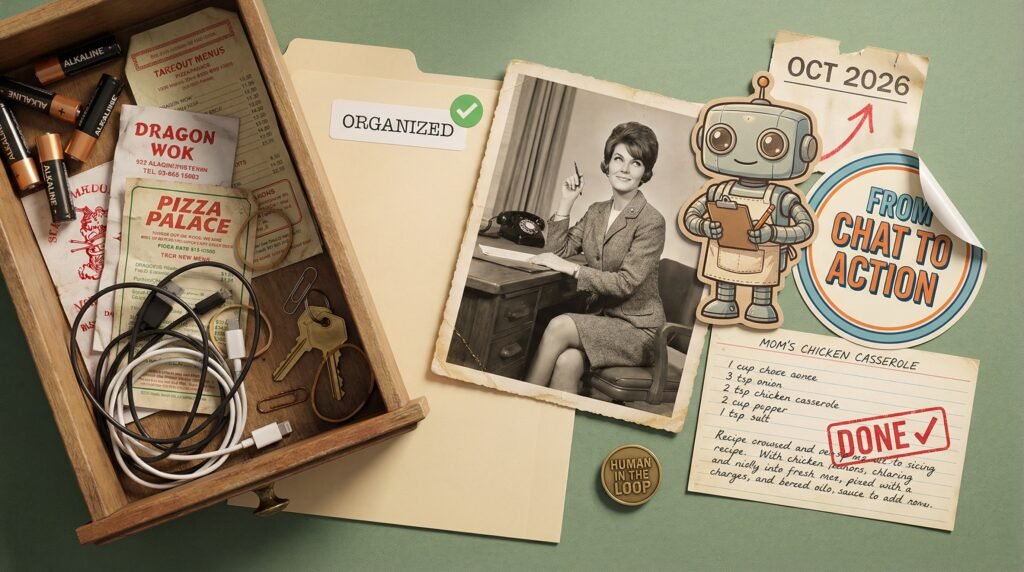
Instead of typing a question and getting an answer, I pointed it at a folder full of messy files … my download folder. I’m not proud when I say that I have 1000s of files in this folder, it’s my equivalent of a “kitchen junk drawer”. You know, the one that doesn’t open or close properly because it holds a kabillion little things you’d forgotten about like dead batteries, takeout menus (which we don’t even use anymore), an original iPod. I sent it away to, “organise these files, rename everything so it makes sense, and give me a summary when you’re done.” It asked me a few questions, we agreed on a naming convention, and it got to work. Then I went and had some lunch and when I came back, it was done. Not sort-of done. Actually done.
Just to be clear, this wasn’t an easy task. My folder contained docs, images, videos, and more. It had to review the contents of documents to decide what they were about, analyzed images to decide if they were dog photos (most of the time) or screenshots, and for videos, it actually took a still from the video to decide what it was for naming! That really did blow my mind. I wouldn’t have thought to suggest that approach. In fact, I didn’t even consider or direct it on how to deal with video files, but it “figured it out”. And let’s be honest, some of my photos are a little unusual, to say the least, and it still managed to name them effectively without asking awkward questions. (Evidence: below)

Recently, Cowork launched on Windows, bringing it to roughly 70% of desktop users worldwide. And that launch, in my experience, is the clearest signal yet that we’ve crossed a line. We’ve moved from “AI that talks to you” to “AI that works for you.”
That shift has a name: AI agents. And if you’ve been hearing “agentic AI” thrown around in every meeting, keynote, and LinkedIn post and wondering whether it’s hype or something you genuinely need to understand … this is your primer.
Chatbots answer your questions. AI agents finish your work.
So What Is an AI Agent, Actually?
An AI agent is software that takes a goal, figures out the steps to get there, and does the work. It doesn’t wait for you to tell it what to do next. It plans, it acts, it adapts when something doesn’t go the way it expected.
The simplest way I can explain it: think about the difference between asking someone for a recipe vs having a gourmet meal served to you. A chatbot gives you directions. An AI agent takes the recipe, gets the ingredients, and cooks it.
We’ve gone through a pretty clear evolution over the past few years. First came chatbots, which could answer questions. Then copilots, which could help you while you worked. Now agents, which can work on your behalf. Same trajectory as every good hire, in my experience … you start by answering questions, then you assist, then you own the work.
Agents vs. Workflows: Know the Difference
This often trips people up, so let me clarify. A workflow with an AI step is like a conveyor belt with one smart station on it. The process is predefined, the AI handles one piece (summarise this document, classify that email), and everything else follows a fixed path. Think Zapier automations or Power Automate flows with a GPT step bolted on.
An AI agent is more like giving someone a goal and letting them figure out how to get there. The agent plans the steps, decides what tools to use, and adapts when things change, without you mapping every decision in advance. My downloads folder is a perfect example, actually. I didn’t build a workflow that said “step 1: sort by extension, step 2: rename PDFs.” I gave it a goal and it worked out the approach on its own, including that clever video screenshot trick I never would have thought of.
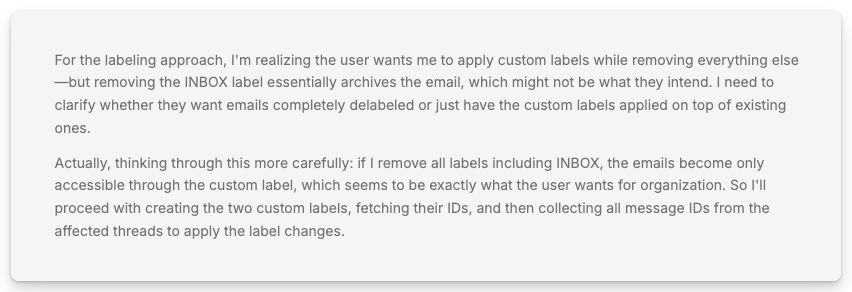
As an illustration, here is an AI agent talking to itself as I tested it triaging an email account. I must say that when these little brain-wheels spin, it makes me want to sit with a bucket of popcorn and watch the show! I suspect if people could watch the insides of my brain in a similar way, they’d want popcorn, too … or maybe a cocktail.
Ultimately, both kinds of agents are valuable. Workflows are brilliant for predictable, repeatable processes. Agents shine when the path to the outcome isn’t always the same. Most organisations will end up using both, and knowing when to reach for which one is becoming a genuine leadership skill. (Add it to the CV, I suppose.)
The AI Agents You’ll Actually Encounter
These aren’t theoretical, enterprise-only tools. They’re platforms you can sign up for, or may already be paying for, right now.
- Claude Cowork (Anthropic): A desktop agent for non-developers. Reads, creates, and organises files. Executes multi-step tasks, no coding required. Now on Mac and Windows. This is the one I use daily, and it’s a brilliant starting point for getting comfortable with agentic AI.
- Microsoft Copilot Agents (via Copilot Studio / M365): Agents embedded across Word, Excel, PowerPoint, Outlook, and Teams. Over 90% of the Fortune 500 are already using Copilot, and Agent Mode is rolling out across Office apps already. Copilot Studio lets you build custom agents with natural language or visual tools.
- Salesforce Agentforce: Enterprise-grade agents for sales, service, and IT workflows built into the Salesforce ecosystem. Uses multiple AI models (including Gemini and Claude). Designed for complex, cross-platform business processes.
- Google Gemini Agent Mode: Agents built into Gmail, Docs, Sheets, and the broader Google Workspace. Connects directly to your tools rather than navigating them from outside.
- OpenAI ChatGPT Agent Mode: Launched mid-2025, this combines web browsing, deep research, and task execution in one interface. A browser-based agent that can navigate websites and complete tasks autonomously.
- Marblism: This is just one example of purpose-built AI Agent platforms. It’s a team of specialised AI “employees” designed for solopreneurs and small businesses. Instead of one general-purpose agent, you get role-specific ones: Eva handles your inbox and calendar, Penny writes SEO blog content, Sonny manages social media, Stan runs sales outreach, and Linda reviews contracts. Describe your business once, and they learn your voice over time. No prompting skills required. (I use this alongside Cowork … different tools for different jobs.)
Agents are already being built into tools you’re probably already paying for. This isn’t a separate technology decision, it’s an evolution of your existing stack. In other words, you might already have agents available and not even know it.
Why This Matters Right Now
Gartner predicts 40% of enterprise applications will feature AI agents by the end of 2026. That’s up from less than 5% in 2025. Read that again. From 5% to 40% in a single year.
PwC reports that 79% of organisations have already adopted AI agents to some extent. And the global AI agents market is projected to grow from $5.1 billion in 2024 to $47.1 billion by 2030, a 44.8% compound annual growth rate.
This isn’t a “watch and wait” trend. It’s moving faster than most leaders’ planning cycles.
What AI Agents Can Actually Do (The Fun Part)
The best way to understand agents, in my experience, isn’t through definitions. It’s through examples. I’ve been scouring the internet (and my own business) to share some cool possibilities and inspiration. I’ve conveniently organised these by the size of operation (you’re welcome, and I enjoyed nerding out!).
Solopreneurs & Small Businesses
The 24/7 “Close-the-Loop” Sales Agent
Unlike a chatbot that just answers FAQs, this agent monitors your CRM. When a lead shows interest but doesn’t book, it sends a personalised follow-up referencing their specific business challenge, checks your actual calendar for a gap, and handles the back-and-forth scheduling without you ever touching an email. You wake up to a booked discovery call.
The Autonomous Content Strategist
Instead of just drafting a post, this agent monitors your industry’s top 10 competitors, identifies trending topics with high engagement, cross-references your own past performance data, and prepares a weekly content calendar with platform-specific drafts. Ready for your one-click approval, not your entire Sunday afternoon.
The “Ghost” Project Manager
An agent that lives in your Slack or email. It “listens” for client requests, automatically creates tasks in your project tool (Trello, Asana, ClickUp), assigns deadlines based on your current workload, sends the client a confirmation with expected timelines, and pings them if their assets are overdue. You stop being the bottleneck.
The Real-Time Inventory & Pricing Sentinel
For e-commerce sellers, this agent monitors competitor pricing and your current stock levels. If a competitor goes out of stock on a product you carry, it raises your price by 5% to maximise margin. If your own stock is ageing, it creates a flash sale campaign and pushes it to your social channels. Margin management on autopilot.
Mid-Sized Businesses
Intelligent Inbox & Request Routing
Every email hitting your general inbox gets read, classified by intent and urgency, matched to the right internal team based on content and sender history, and routed with a drafted reply for the team member to review. Support requests go to support. Sales enquiries go to the right rep. Partnership pitches go to BD. No one plays traffic cop anymore.
Proactive Customer Churn Prevention
Monitors product usage data alongside support tickets. If it detects a churn signal, like a user who hasn’t logged in for 10 days after a reported bug, it drafts a personalised reach-out from their account manager with a “how can I help?” video link already embedded, and alerts the CS team with the full context. You catch the ones slipping away before they’ve made up their mind to leave.
The Marketing-to-Revenue Feedback Loop
Analyses which marketing leads actually closed as high-value deals, then autonomously goes back into your ad platforms to adjust bidding strategies toward those specific audience profiles. It’s not reporting on what happened last quarter, it’s actively redirecting spend toward what’s working. Your marketing budget gets smarter every week without anyone touching it.
Dynamic Supply Chain Remediation
A shipment gets delayed due to weather or logistics. The agent doesn’t just alert you, it calculates the downstream impact on current orders, searches for alternative suppliers or shipping routes, gets quotes, and presents the operations manager with the best fix for a final go/no-go. Decision-ready, not just alarm-ready.
Enterprise
The Multi-Agent Regulatory Compliance Swarm
A network of agents where a “Monitor Agent” tracks global regulatory changes (GDPR, AI Act, industry-specific rules), a “Policy Agent” drafts internal updates to reflect those changes, and a “Communication Agent” pings relevant department heads with the specific actions they need to take to remain compliant. Compliance becomes proactive instead of reactive.
Strategic Market Intelligence “Decision Packs”
Instead of a static report, this agent-set monitors earnings calls, patent filings, and news for your top 50 global competitors. Every Monday morning, the C-suite receives a “Decision Pack” highlighting three strategic threats and two opportunities, with supporting data and recommended responses. Not a dashboard. A brief.
Autonomous Cybersecurity “Red-Team” Defence
A highly governed agent that constantly runs simulated “friendly” attacks on your own infrastructure to find vulnerabilities before anyone else does. When it finds one, it autonomously drafts a patch and notifies the security team with severity and blast radius analysis. Your “Mean Time to Remediate” drops from weeks to hours.
Hyper-Personalised CX Orchestration
Ensures a customer’s experience stays consistent across web, mobile, and retail. A high-value customer has a bad flight? The CX agent detects it via flight data, triggers an autonomous apology with a personalised voucher, and briefs the hotel check-in staff to offer a room upgrade. All without a single human manual entry.
AI agents don’t just save time. They give you back the kind of time you actually want, the thinking time, the strategy time, the ‘what’s next’ time.
You Don’t Need to Be Technical to Build One
Most people assume you need a developer to create an agent. In fact, I had this conversation with someone just the other day so I know that’s a real concern. As someone who doesn’t code, I assure you that you don’t. Not anymore.
Using an agent like Cowork is exactly as complicated as describing what you want done. “Organise all files in my Downloads folder by type and rename them based on content.” The agent might ask a few clarifying questions and then it will plan the steps and do it. No configuration, no code, no setup beyond granting folder access.
Building a custom agent is getting just as accessible. Microsoft’s Copilot Studio has made “conversation the agent-making interface,” which is a fancy way of saying you describe what you want in plain language and it builds the thing. A sales ops manager can describe and publish an agent that monitors pipeline changes, flags at-risk deals, and notifies account owners with recommended next steps, without writing a single line of code.
In other words, the barrier to entry went from “hire a developer” to “just say it already!” And that changes who gets to build these tools. IMPORTANT NOTE: This has some real pros and cons which I’ll talk more about in a future article. Suffice to say that developers and analysts will need to step up as reviewers and verifiers!
A Quick Note on Cost (And Why It’s Worth It)
Most of these tools come with a price tag. Claude Cowork requires a paid Claude plan (starting at $20/month). Microsoft Copilot Agents need a Microsoft 365 Copilot licence. Marblism runs about $39/month.
I suggest thinking about it this way: what’s your time worth to you? If an agent saves me just one hour a month, it’s already paid for itself – especially if I use that hour to grow my revenue or build a relationship. And in my experience, saving an hour with AI is a slow week.
Three Things to Keep in Mind Before You Go Full Speed
I’ve learned a few things the expensive way, so allow me save you some tuition.
📘 Start with one workflow, not a whole department. The biggest agent failures come from over-scoping. Pick one repeatable task, prove the value, then expand. For me, I often run through processes manually a few times so I can see what I would want and expect before trying to automate anything.
📗 Keep humans in the loop. The best agent implementations treat human oversight as a feature, not a limitation. Cowork, for example, shows you its plan and asks before taking significant actions. That’s not a weakness, that’s good design. (Revolutionary concept, I know.)
📕 Treat permissions like onboarding. You wouldn’t give a new hire access to everything on day one. Same principle. Start with controlled folder access and expand as trust builds.
Your Homework: Three Things to Try This Week
Don’t just read about agents. Try one. Three experiments, one for each tool, each taking less than fifteen minutes.
1. Organise your Downloads folder with Claude Cowork. Tell it to sort files by type, rename them based on content, and move anything older than 90 days to an archive. It’s the fastest “aha moment” you’ll have with agentic AI.
2. Ask Microsoft Copilot to summarise your unread emails and flag what actually needs a response. Most M365 users already have some version of Copilot available and haven’t tried this yet. Five minutes. Usually produces an “oh wow” moment.
3. Set up a Marblism social media agent to draft a week of posts from a single blog post. Point Sonny at a recent piece of content and let it create platform-specific posts. Review, tweak, approve. Done.
Three tools, three use cases, three chances to see what all the fuss is about. Just remember, they’re still interns at the end of the day, and they need your guidance and validation.
• • •
Frequently Asked Questions
What is an AI agent?
An AI agent is software that takes a goal, plans the steps needed to achieve it, and executes those steps autonomously. Unlike a chatbot that answers one question at a time, an agent can manage multi-step workflows, use different tools, adapt when things change, and check in with you when it needs guidance.
Think of the difference between asking someone a question and handing someone a project. A chatbot handles questions. An agent handles projects.
What’s the difference between an AI agent and a chatbot?
A chatbot responds to individual prompts with text-based answers. An AI agent takes a broader goal, breaks it into steps, executes actions across tools and systems, and delivers finished work. Chatbots tell you something. Agents do something.
The evolution has gone from chatbots (answer questions) to copilots (assist while you work) to agents (work on your behalf). Most major platforms, including Microsoft, Google, Salesforce, and Anthropic, are now building agent capabilities into their products.
What’s the difference between an AI agent and a workflow?
A workflow with an AI step follows a predefined process where AI handles one specific task, like summarising a document or classifying an email. The rest of the process is fixed. An AI agent takes a goal and figures out how to achieve it, planning steps, choosing tools, and adapting as needed.
Workflows are ideal for predictable, repeatable tasks. Agents are better when the path to the outcome varies. Most organisations benefit from using both.
What is Claude Cowork?
Claude Cowork is Anthropic’s desktop AI agent, available on Mac (launched January 12, 2026) and Windows (launched February 10, 2026). It works directly on your local files, planning and executing multi-step tasks like organising folders, processing documents, creating reports, and managing data, all without requiring coding knowledge.
Cowork requires a paid Claude subscription (Pro at $20/month, Max at $100-200/month, Team, or Enterprise). It’s built on the same architecture as Claude Code but designed for non-developers.
How is Claude Cowork different from regular ChatGPT or Claude chat?
Regular AI chat tools respond to individual prompts in a conversation window. You type a question, you get an answer, and you manually move information between the chat and your actual work. Cowork operates directly on your files, executing multi-step tasks autonomously and saving finished work without manual file handling.
The key difference is action versus conversation. Chat tells you how to do something. Cowork does it.
What are Microsoft Copilot Agents?
Microsoft Copilot Agents are AI agents embedded across Microsoft 365 applications including Word, Excel, PowerPoint, Outlook, and Teams. Agent Mode, rolling out in early 2026, enables AI to work alongside users by actively making changes to files, summarising communications, and automating workflows.
Microsoft Copilot Studio also allows users to create custom agents using natural language descriptions, no coding required. Over 90% of Fortune 500 companies already use Microsoft 365 Copilot.
Do I need technical skills to use AI agents?
No. Most modern AI agent platforms are designed for non-technical users. Claude Cowork works by describing what you want done in plain language. Microsoft Copilot Studio lets you build agents through natural language or visual tools. Marblism requires only a business description to get started.
The barrier to entry for AI agents has shifted from “hire a developer” to “describe the outcome you want.” More complex enterprise deployments may benefit from technical expertise for integration and governance, but getting started? Just describe what you need.
Are AI agents only for big companies?
Not at all. Many AI agent platforms are specifically designed for solopreneurs and small businesses. Marblism (starting at $39/month) provides a full team of specialised AI agents for tasks like email management, social media, sales outreach, and content creation. Claude Cowork (starting at $20/month) handles file organisation, document creation, and data processing for anyone.
Small businesses often see the fastest ROI from agents because the time savings are felt immediately when every hour of your day already has three things competing for it.
Are AI agents safe to use with business data?
Reputable AI agent platforms include security measures such as sandboxed execution, user-controlled permissions, and enterprise compliance features. Claude Cowork operates directly on your local machine and asks permission before taking significant actions. Microsoft Copilot Agents operate within Microsoft 365’s compliance boundary with role-based access controls.
The practical advice is to treat agent permissions like employee onboarding: start with limited access, build trust through use, and expand permissions gradually.
Will AI agents replace employees?
AI agents handle repetitive, time-consuming tasks so that humans can focus on work that requires judgment, creativity, relationships, and strategic thinking. The companies seeing the best results from agents aren’t replacing people, they’re freeing people to do more valuable work.
The real risk isn’t agents replacing your team. It’s competitors using agents to move faster while your team is still buried in admin work.