It’s the question I get asked more than any other
Can I safely use my data with AI?
I get asked this question probably more than any other. It shows up in the Q&A, in the hallway afterward, and in the slightly nervous email three days later from the person who didn’t want to ask in front of the room. And it almost never arrives on its own. It turns up wearing a dozen different outfits. Should I put in customer names? What about my company’s IP? I’m in mortgage (or healthcare, or wealth management), so am I even allowed to? My company gave us Copilot, is that the safe one? I use ChatGPT for everything, should I be worried? Should I connect my calendar? My email?
Sound familiar?
What I’ve come to realize is that all of those questions are really one question, and the reason people feel overwhelmed isn’t that the answer is complicated. It’s that nobody has ever given them a clear one. So let’s fix that. The good news, and I mean this, is that you can absolutely use your data with AI safely. “Safely” just depends on a few things you actually control, and once you can see them, the whole topic stops being scary.
The reassuring part, and I mean this, is that almost all of it comes down to a few things you control. So let’s start there.
You’re probably already doing this (most people are)
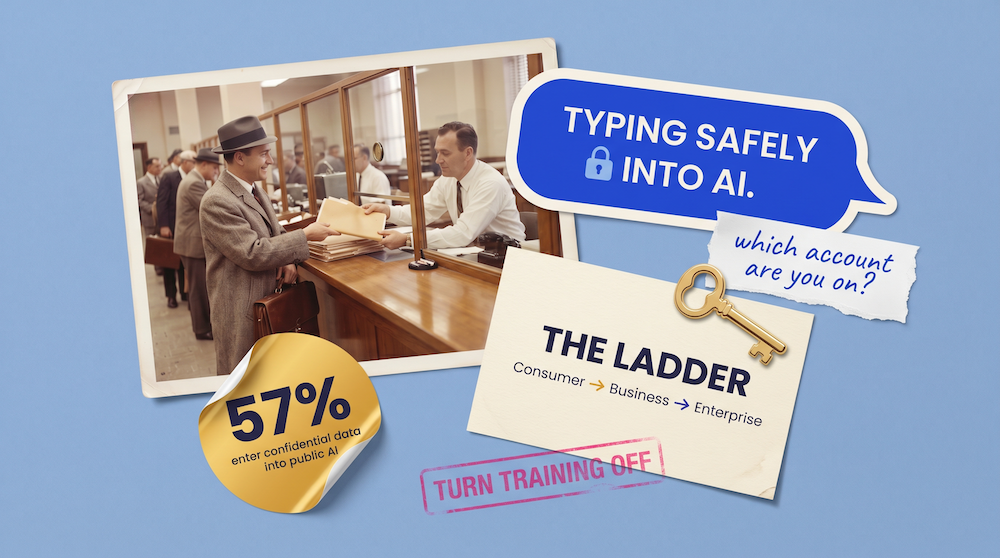
Let me put the scale of it on the table. In a TELUS Digital survey of 1,000 US enterprise employees, 57% admitted they’d entered confidential company information into public AI tools like ChatGPT, Gemini, and Copilot, and 68% were doing it through personal accounts rather than anything their company had set up. Which is the polite way of saying that most of the data going into AI is going in through the back door, by people who genuinely have no idea what the rules are. (I find that more reassuring than alarming, oddly. It means the problem isn’t recklessness. It’s a clarity gap, and clarity is fixable.)
So before we talk about which tool is “safe,” we need to talk about what actually happens to your words after you hit enter. Because almost nobody has been told.
What actually happens when you type something into a chat box
When you type a message into ChatGPT, Claude, Gemini, or Copilot and send it, your text leaves your device and travels (encrypted, in transit) to the company’s servers. That’s where the model lives. Your words get processed, an answer comes back, and in most cases a copy of that conversation is saved to your account as history so you can find it again later.
That much is the same everywhere. The part that varies, and the part that matters, is what happens to that saved copy next. Depending on which tool you’re using, which plan you’re on, and which settings are switched on, your conversation might be used to help train future versions of the model, it might be kept on the company’s systems for a long time, and in some cases a sample of conversations gets reviewed by actual humans to check quality and catch abuse.
One detail that surprises people. Deleting a chat usually removes it from your history right away, but there’s typically a back-end window (often around 30 days) before it’s fully purged, and crucially, anything that’s already been used to train a model can’t be pulled back out afterward. The training has happened. To my mind that’s the single most important reason to get your settings right now rather than later, because the only data you can fully control is the data you haven’t sent yet.
None of this means the tools are dangerous. It means they’re not a sealed vault, and you should know which version of them you’re standing in.
The one distinction that answers most of your questions
If you remember nothing else from this piece, remember this. There’s a world of difference between a consumer account and a business or enterprise account, and that single line settles most of the worry.
A consumer account is the personal one. You signed up with your own email, maybe you pay for a Plus or Pro or Max subscription, and there’s no contract between your company and the AI provider. On these accounts, your conversations are generally fair game for model training (sometimes by default, sometimes via a setting you’re asked to choose), and they tend to stick around longer.
A business or enterprise account is different in the way that counts. Your organization has signed a commercial agreement with the provider, and under that agreement your data isn’t used to train the models, you get admin controls and audit trails, and the company can decide how long things are kept. This is the version built for company data.
So when someone asks me “is ChatGPT safe?”, it’s surprisingly hard to give a straight answer. It’s a simple question, but a few things hide underneath it. Which version are you on? Which account are you logged into? Which settings are switched on? Answer those and you’ve basically got it.
The five-second setting to check today
On any consumer account, there’s usually a toggle deciding whether your chats get used to train the model, and turning it off is the highest-value five minutes you’ll spend this week. Menus move around, so treat these as a map rather than gospel, but as of right now:
ChatGPT
Settings, then Data Controls, where you switch off “Improve the model for everyone.” Training is on by default on personal Free, Plus, and Pro accounts, so this one matters. (Temporary Chat, the incognito-style option, isn’t used for training at all, which is handy for one-off sensitive questions.)
Claude
Privacy Settings, where you choose whether your chats and coding sessions help train Claude, have some real stakes attached. On the consumer plans, allowing training lets Anthropic keep that data for up to five years, while declining it drops retention to around 30 days.
Gemini
The control is called Gemini Apps Activity. While it’s on, a sample of your conversations can be used to improve Google’s services and can be reviewed by trained humans, and those reviewed chats can be kept for up to three years. Turning Activity off stops the training and the human review.
Copilot
The setting depends entirely on which account you’re using, and that’s such a common trip-up it gets its own section below.
Google, to its credit, openly tells people not to put confidential information into consumer Gemini, which tells you something.
The four tools, plainly explained
Claude (Anthropic)
On the consumer plans (Free, Pro, Max), your data may train future models depending on the setting above, with retention stretching to five years if you allow it. On the commercial side (Claude for Work, Team, Enterprise, and the API), your data isn’t used for training, full stop. That’s the version for business data. The thing to watch is simply which account you’re logged into, because the interface looks nearly identical either way.
ChatGPT (OpenAI)
On personal accounts (Free, Plus, Pro), training is on by default and you can switch it off. On the business tiers (Business, Enterprise, Edu) and the API, OpenAI doesn’t use your inputs or outputs to train models by default, and you get the admin controls and contractual protections that come with that. Again, the gotcha is the account. People log into their personal ChatGPT out of habit and forget the company workspace exists.
Gemini (Google)
On a personal Google account, the Gemini Apps Activity story above applies, and the human-review piece is the part most people don’t expect. On a Google Workspace (work) account, the protections are stronger. Content isn’t human-reviewed or used to train Google’s models outside your domain, and your admin governs it. The two things to watch are human review on the consumer side and, separately, what you connect it to (Gmail, Drive, and the rest), which we’ll get to.
Microsoft Copilot
Copilot is the most confusing, in my opinion, because there are actually two different Copilot experiences, both unhelpfully called “Copilot.” Each one treats your data very differently, so what you get comes down to the account you’re signed in with.
If you’re logged in with your work or school account, Microsoft 365 Copilot (and Copilot Chat) runs under what Microsoft calls Enterprise Data Protection. Your prompts, the responses, and the company data it reaches through Microsoft Graph aren’t used to train the foundation models, your data stays inside your organization’s boundary, and it only surfaces information you already have permission to see. That’s genuinely reassuring, and it’s why “my company uses Copilot” is usually a good sign.
If you’re signed in with a personal Microsoft account, consumer Copilot behaves more like the other personal tools, where your data can be used to improve the models unless you opt out.
There’s one gotcha even on the safer enterprise version. Because Copilot respects your existing permissions, it’s only as tidy as those permissions are. If half your company can technically open a folder full of sensitive files, Copilot will cheerfully surface that content to all of them when asked. Copilot didn’t cause that, it just exposed a housekeeping problem that was sitting there all along. <span class=”jh-aside”>(In my experience, the AI rollout is often the first time anyone notices how leaky the internal permissions already were.)
License levels, from least protected to most
People assume that paying for AI makes their data private. It’s the most common misconception I run into, and it’s worth busting head-on. The ladder runs from least protected to most protected.
- Free consumer. Trains on your data (by default or via a setting), longest retention, no contract, no oversight. Perfectly fine for low-stakes, non-confidential work. Brainstorming a blog title, summarizing a public article, that sort of thing.
- Paid consumer (Plus, Pro, Max). This is the one that surprises people. Paying for a personal plan buys you more capability, not more privacy. The data rules are essentially the same as the free tier. You’re not safer because you handed over a credit card.
- Business or Team. Now you’re under a commercial agreement. No training on your data by default, admin controls, and usually a Data Processing Addendum. This is the floor for company data, the point at which you can reasonably relax.
- Enterprise. Adds the heavier machinery. Single sign-on, audit logs, retention you control, data residency choices, and independent certifications like SOC 2 Type 2 and ISO 27001 that prove the provider’s controls have been examined by an outside auditor.
- API with zero data retention. This is for built applications rather than chat windows. In the right commercial setup, API use can be configured for very low retention, which is why it’s often the preferred route for sensitive applications. It’s what most regulated and genuinely sensitive workloads get built on, and it’s the tier we build on at Rivet Labs precisely because it keeps client data off the provider’s systems entirely.
A consumer chatbot is a gifted assistant with a long memory and no contract. Use it accordingly.
“But what about my IP? Can someone pull it out of ChatGPT?”
This one comes up constantly, usually from content creators and from leaders guarding something proprietary, and the two cases pull in opposite directions, so let’s take them one at a time.
For content creators, my honest opinion is going to sound almost reckless. So what?
Hear me out. If you’re a speaker, an author, a coach, anyone whose ideas are meant to travel, then the entire point of your IP is that it gets out into the world. The moment your framework leaves your mouth on a podcast, lands in an article, or goes up on your website, you should simply assume AI knows about it. Not because of anything you typed into a chatbox, but because the public web is precisely what these models are trained on. Your published work is out there being scraped, quoted, and absorbed, and there’s no setting anywhere that changes that. Trying to keep public ideas away from AI is like trying to keep your billboard away from people with eyes.
So rather than fret about it, claim it. Loudly, repeatedly, everywhere. The protection for a content creator was never secrecy, it’s being the recognized source. If your ideas are so clearly yours that people can’t think them without thinking of you, AI knowing them is free distribution, not theft.
One small piece of honesty so you’re not surprised. AI won’t always attribute. It can repeat an idea, sometimes even your exact phrasing, without a citation, the same way a person can quote something clever they once heard without remembering where. Annoying, yes. But the answer to that is the same as it’s always been for anyone with ideas worth stealing, you out-publish, you out-associate, and you make your name inseparable from the concept. (Ask me how I feel watching one of my framework names show up in someone’s LinkedIn post with no credit. And then ask me whether I’d rather it never traveled at all. Easy choice.)
Now the opposite case. If you’re trying to hold something back from competitors, a not-yet-launched product, a pricing model, an unreleased strategy, the calculus flips entirely, and this is where I get firm. Genuinely confidential, unpublished IP doesn’t go into a consumer AI tool. The cautionary tale here is real. Samsung engineers reportedly pasted proprietary source code into ChatGPT to debug it, and that’s the exact scenario you’re trying to avoid, because that code was never meant to see daylight. Unpublished IP belongs under the same rule as client data and regulated information from the rest of this piece. Business or enterprise tier under a proper agreement, or it stays out.
The clean line to carry around is this. Published IP, share it and own it. Unpublished IP, protect it like the asset it is.
Your published ideas don’t need protecting from AI. They need claiming. It’s the unpublished ones that need the locked door.
A short, nerdy detour for the curious (skip if you like)
Once you understand this next bit, a lot of the fear settles down. When your conversation is used to train a model, your words aren’t being filed away in some giant searchable database, sitting there as a tidy block of text waiting for a stranger to call it up. That’s the mental picture most people have, and it’s the wrong one.
What actually happens is that your text gets broken into tokens (small fragments of words) and used to nudge the statistical patterns inside the model, the thing engineers call its weights. The model doesn’t store your sentence. It very slightly adjusts its sense of which words tend to follow which other words. Your individual contribution mostly dissolves into an ocean of patterns.
For something to come back out word for word (researchers call this memorization), it generally has to have appeared in the training data many times in the same form. Stanford researchers studying this found that a non-trivial amount of repetition is needed for verbatim memorization to happen. Something you typed once, in one conversation, is extraordinarily unlikely to ever resurface in someone else’s chat. The odds of a competitor casually stumbling onto your single prompt while noodling on their own idea are, practically speaking, somewhere near nil.
The honest footnote, because I’d rather you have the real picture than a comforting half of it. That repetition can come from the wider world, not just from your own keyboard. If a popular idea of yours gets quoted, syndicated, and re-posted across hundreds of pages, it can become memorizable that way, no chatbox required. Which loops us right back to where we started, because it’s your published footprint that AI learns most reliably, and that was always the part you wanted out there anyway.
“But I’m in a regulated industry”
This is the question I get from mortgage, healthcare, finance, and legal audiences, and the answer is yes, you can use AI, but almost never on a consumer account.
The agreements you’re required to have only exist on the business and enterprise tiers. For most industries that means a Data Processing Addendum, and for anyone touching protected health information it means a Business Associate Agreement, or BAA. OpenAI, for example, will sign a BAA for its healthcare and API products with zero data retention configured, and it won’t do so for Free, Plus, Pro, or even standard Business. The contractual protection simply doesn’t reach the consumer tiers, no matter how carefully you use them.
So if you’re in mortgage, the nonpublic personal information your clients hand you (Social Security numbers, account numbers, income documents) doesn’t belong in a personal ChatGPT window. Not once, not “just to draft something quickly.” The same logic covers protected health information in healthcare, privileged material in legal, and client holdings in wealth management.
One thing gets lost in every vendor brochure. The agreement only covers the provider’s side of the line.
Your provider’s contract protects their side of the line. Everything your team types before the data gets there is still on you.
You can have the most ironclad enterprise contract on the planet and still spring a leak the moment one well-meaning person pastes a client file into their personal account to save five minutes. The technology can be compliant while the behavior around it isn’t. That’s why the real work in regulated industries is less about choosing the tool and more about making sure your people know, without having to guess, what they can and can’t put where. (And please, check with your own compliance or legal team and your regulator’s guidance. I build this stuff for a living, which is exactly why I know I’m not the person to give you the legal version.)
Should you connect your calendar, email, and files?
You can, and honestly it’s often where AI gets genuinely useful. An assistant that can see your calendar can actually schedule things. One that can read the right folder can answer questions about your own work instead of making things up.
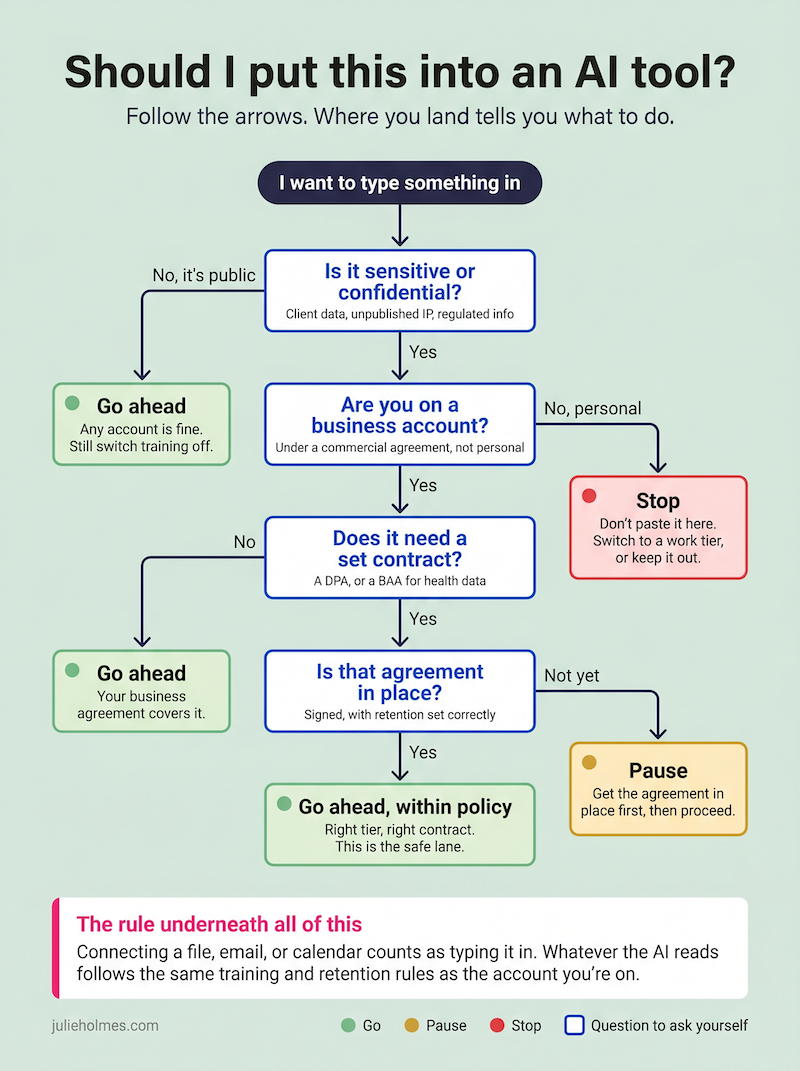
The simplest way to think about a connection is this. When you link a data source to an AI tool, or upload a file into it, treat it exactly as though you’d typed every word of that content into the chat box yourself. Because functionally, that’s what you’ve done. Whatever the tool actually opens and reads, the confidential clause buried in that PDF, the client details in that email thread, the numbers in that Google Doc, all of it becomes an input the moment the AI processes it. The same permissions, the same warnings, and the same training and retention rules apply. A connection doesn’t get a special pass just because you didn’t type the words by hand.
Which means this lands right back on the distinction we keep coming back to. On a consumer account, a sensitive document you let the AI read is treated like sensitive text you pasted in. On a managed work account under an agreement, that same document inherits the business-tier protections instead. The connection takes on whatever rules the account already has.
So the principle is to match the access to the sensitivity. Connecting a tool to your email or Drive is like handing a new assistant the keys to specific rooms. You wouldn’t give a brand-new temp the master key to the entire building on day one, and you don’t need to here either. On a personal account, be conservative about what you plug in. On a managed work account, those connections are usually controlled by your IT admin, which is precisely where that decision belongs.
A final reminder…
Vendor policies can (and do) change regularly. Make sure you’re regularly checking terms, conditions and policies!
• • •
The big picture
If you want the whole thing on one screen, here’s the decision in a single view. Screenshot it, pin it above your desk, send it to the person on your team who keeps asking.
• • •
Your homework
- Know which account you’re standing in. Personal, or work. This one answer resolves most of the anxiety, so check it before anything else.
- On any consumer account, go and turn off training today. It’s five seconds and it’s the difference between your words feeding a future model or not.
- Keep genuinely sensitive or regulated data out of consumer tools entirely. If it has to go into AI, it goes through a business or enterprise tier under a proper agreement, or it doesn’t go in at all.
- Find out whether your company has an AI policy. If it does, read it. If it doesn’t, that absence is the actual risk, far more than the tools themselves.
- For connectors, match the access to the sensitivity. Start narrow. You can always open more doors later.
The real gap isn’t the technology
Underneath every version of this question is the same thing. People aren’t being reckless. They’re guessing, because nobody handed them a clear answer. That’s a leadership gap, not a technology one.
The organizations that get this right give their people three things so the guessing stops. Principles, meaning what we actually believe about handling data with AI. Policies, meaning the rules in plain language with real examples, the “never paste a client’s account number into a chatbot” kind of specific. And playbooks, meaning which tool to use for which kind of work. When those three exist, something lovely happens. The anxiety drops and the safe usage goes up, at the same time.
That’s a lot of what I do with teams, turning “I’m scared I’ll do something wrong” into “I know exactly what’s fine and what isn’t.” If your people are guessing about this (and the survey says they almost certainly are), let’s have a conversation about giving them a clear answer instead.
Frequently Asked Questions
Is it safe to put customer data into ChatGPT?
It depends entirely on which ChatGPT you’re using. On a personal Free, Plus, or Pro account, you shouldn’t enter customer data, because those conversations can be used to train OpenAI’s models and aren’t covered by any agreement with your company. On a ChatGPT Business or Enterprise account, your data isn’t used for training and is governed by a commercial contract, which makes it appropriate for company data.
The safest habit is to treat any personal AI account as a public space and any properly set up business account as a private one. If you’re not certain which you’re logged into, that uncertainty is your answer to check first.
Does AI train on what I type?
On consumer plans, often yes, unless you turn it off. ChatGPT trains on personal-account conversations by default, Gemini can use and human-review conversations while Gemini Apps Activity is on, and Claude’s consumer plans use your chats for training depending on a setting you’re asked to choose.
On business and enterprise tiers across all the major providers, the default flips. Your data isn’t used to train the models, because that protection is written into the commercial agreement your organization signs.
Can someone pull my private data or IP out of ChatGPT?
For something you typed once into a chatbox, it’s extremely unlikely. Training doesn’t store your words as searchable text, it breaks them into tokens and absorbs them as statistical patterns, and reproducing anything word for word generally requires that exact sequence to have appeared in the training data many times. A single private prompt almost never resurfaces in someone else’s chat.
The bigger exposure is your published work, which AI learns reliably because it’s all over the public web. For content creators that’s usually fine, even useful, as long as you’re the recognized source of your ideas. The real caution is unpublished, confidential material like unreleased products, proprietary code, or pricing models, which should only go into a business or enterprise tier and never a personal consumer account.
How do I stop AI from training on my data?
Open the privacy or data settings of whatever tool you use and switch off the training option. In ChatGPT it’s under Settings, then Data Controls (“Improve the model for everyone”). In Claude it’s in Privacy Settings. In Gemini it’s the Gemini Apps Activity control.
Bear in mind this only affects data going forward. Anything already used to train a model can’t be removed retroactively, which is why it’s worth doing today rather than next quarter.
Is Microsoft Copilot safe for company data?
Microsoft 365 Copilot used with your work or school account is built for company data. Your prompts, responses, and the company information it accesses aren’t used to train the foundation models, and your data stays within your organization’s boundary. The consumer version of Copilot, signed in with a personal Microsoft account, doesn’t carry those protections.
One caveat worth knowing. Even the enterprise version only shows people data they already have permission to access, so if your internal file permissions are messy, Copilot can surface things more widely than you’d like. That’s a permissions housekeeping issue, not a Copilot flaw.
Is ChatGPT safe to use at work?
It absolutely can be, on the right account. The business and enterprise versions of ChatGPT are designed for workplace use, with no training on your data and proper admin controls. The personal version is fine for low-stakes, non-confidential tasks but isn’t appropriate for sensitive company or client information.
The most common workplace mistake is people defaulting into their personal ChatGPT account out of habit, even when their employer has set up a protected business workspace. Knowing which one you’re in solves most of the risk.
Can I use AI in a regulated industry like mortgage or healthcare?
Yes, but almost always on a business or enterprise tier under a formal agreement, never on a consumer account. Regulated work requires contracts like a Data Processing Addendum, and for health data a Business Associate Agreement, and those only exist on the business and enterprise products.
Just as importantly, the agreement covers the provider’s handling of data, not what your team types in. Even with the right contract, regulated organizations need clear internal rules so nobody pastes Social Security numbers, account details, or protected health information into the wrong tool. Always confirm the specifics with your own compliance team and regulator.
What’s the difference between free and paid AI for data security?
For personal accounts, surprisingly little. Paying for a Plus, Pro, or Max subscription buys you more capability, faster models, and higher limits, but the data handling rules are essentially the same as the free tier. A paid personal account isn’t a private one.
The meaningful jump in protection happens when you move from any consumer plan to a business or enterprise plan. That’s where the no-training guarantee, retention controls, and contractual protections actually live.
Should I connect my email or calendar to AI?
You can, and it’s often where AI becomes genuinely useful, but treat any connection as if you’d typed the contents into the chat box yourself. Whatever the tool reads becomes an input, so it follows the same training and retention rules as anything else, inheriting the protections of whichever account you’re on. On a personal account, be conservative and connect only what you’re comfortable having the tool read. On a managed work account, those connections are usually governed by your IT administrator, which is the right place for the decision to sit.
Think of each connection as handing a new assistant the keys to one specific room rather than the whole building. Start narrow, and expand access only as your trust and your understanding grow.
Does deleting a chat remove my data completely?
Not always, and not instantly. Deleting a conversation typically removes it from your visible history right away, but providers usually keep a copy on their back-end systems for a short window (often around 30 days) before fully purging it. Anything that’s already been used to train a model can’t be removed at all.
This is why the most effective privacy step is preventative rather than reactive. Turning off training and being thoughtful about what you enter protects you far more than deleting conversations after the fact.